未安装cuda需自行安装cuda
- 查看cuda版本
C:\Users\29955>nvcc --version
nvcc: NVIDIA (R) Cuda compiler driver
Copyright (c) 2005-2025 NVIDIA Corporation
Built on Fri_Feb_21_20:42:46_Pacific_Standard_Time_2025
Cuda compilation tools, release 12.8, V12.8.93
Build cuda_12.8.r12.8/compiler.35583870_0 - 安装支持 CUDA 12.8 的 PyTorch GPU 版本(Windows)
这里的cu121是支持CUDA 12.1的版本,目前12.8的CUDA基本兼容12.1的运行时。如果有官方12.8支持,后续会更新。
pip install torch torchvision torchaudio --index-url https://download.pytorch.org/whl/cu121- 安装Ultralytics YOLO(Python版)
pip install ultralytics- 验证 PyTorch GPU 支持
test_pytorch_cuda.py
import torch

print("PyTorch version:", torch.__version__)
print("CUDA version PyTorch is built with:", torch.version.cuda)
print("Is CUDA available:", torch.cuda.is_available())
if torch.cuda.is_available():
    print("CUDA device name:", torch.cuda.get_device_name(0))
else:
    print("CUDA is not available. Check your installation.")
输出说明
PyTorch version:显示PyTorch版本号CUDA version PyTorch is built with:显示PyTorch绑定的CUDA运行时版本Is CUDA available:如果是True,说明PyTorch能检测到你的GPU和CUDA环境正常- 如果可用,会打印显卡名称
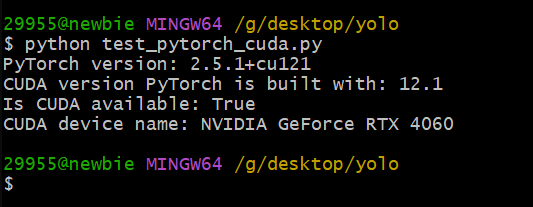
- 测试推理,编写测试脚本,使用官方的yolov5s.pt模型
yolo_video_test.py 会自动下载yolov5s.pt模型
import cv2
from ultralytics import YOLO

# 加载模型(自动下载yolov5s权重)
model = YOLO('yolov5s.pt')

# 打开视频文件或摄像头
cap = cv2.VideoCapture('test_video.mp4')  # 或 0 表示摄像头

while cap.isOpened():
    ret, frame = cap.read()
    if not ret:
        break

    # 使用YOLO模型推理,返回检测结果
    results = model(frame)

    # 在图像上绘制检测框和标签
    annotated_frame = results[0].plot()

    # 显示结果
    cv2.imshow('YOLO Video', annotated_frame)

    # 按q退出
    if cv2.waitKey(1) & 0xFF == ord('q'):
        break

cap.release()
cv2.destroyAllWindows()
将一个视频放在同目录并更名为test_video.mp4
python yolo_video_test.py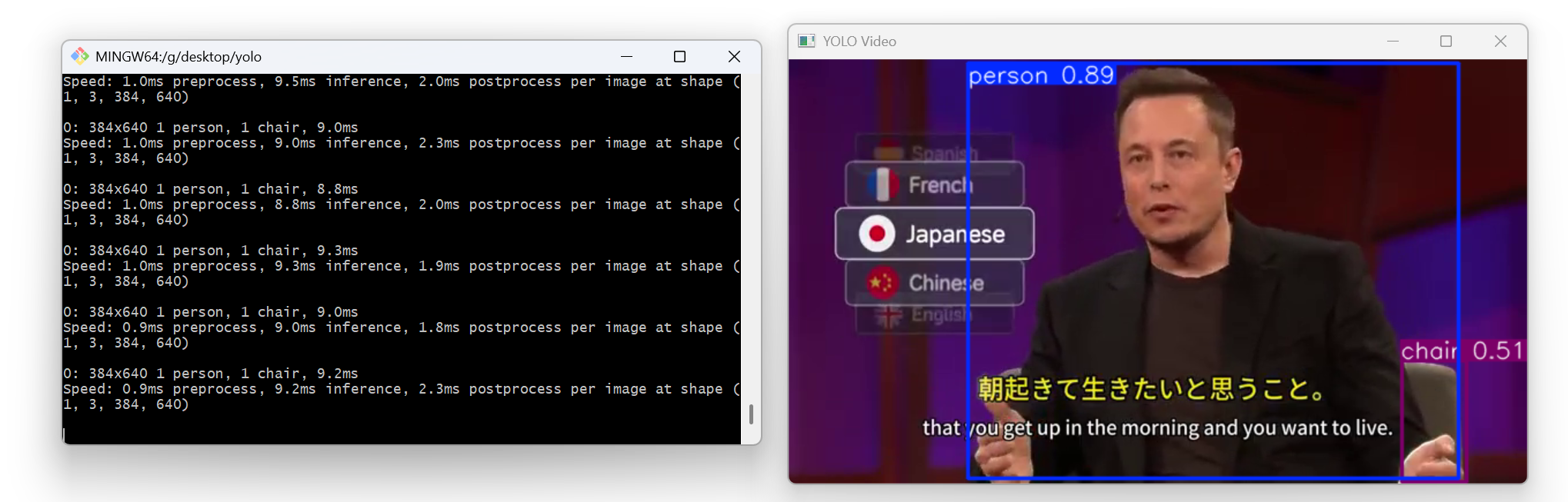
9ms左右一帧